Meet Mia, the receptionist on your second line.
Mia is the AI receptionist built into 2Line.AI, the second-phone-number app for US small businesses. She answers calls on your 2Line number in your business name, books appointments into your hours, texts callers what happens next and leaves you a written slip, so you don’t lose a job while your hands are full.
Mia at a glance
| What she is | An AI receptionist (voice agent) built into the 2Line.AI app |
|---|---|
| Made by | 2Line AI LLC, United States |
| Works on | Your 2Line.AI business number, on iPhone, Android and the web app |
| When she answers | Always, only after hours, or only when you don’t pick up. You choose |
| Voices | Warm, Bright or Calm |
| Cost | 48 credits a minute while she’s on a call, counted from when she picks up. No monthly cap on calls |
| Where numbers come from | US local numbers only |
What happens when Mia answers
- 1She picks up in your business nameUsing the greeting you approved, for example “Thanks for calling QuickFix Plumbing, this is Mia.”
- 2She finds out what the caller needsQuestions about your services, hours and prices come from what you taught her. For on-site work she asks for the job address.
- 3She books it, or flags itIf they want an appointment she offers times inside your business hours. Urgent calls she flags, and you can take any call with Hand to me.
- 4The caller gets a textAfter the call, one “what happens next” text from your number, so they know they’ve been heard.
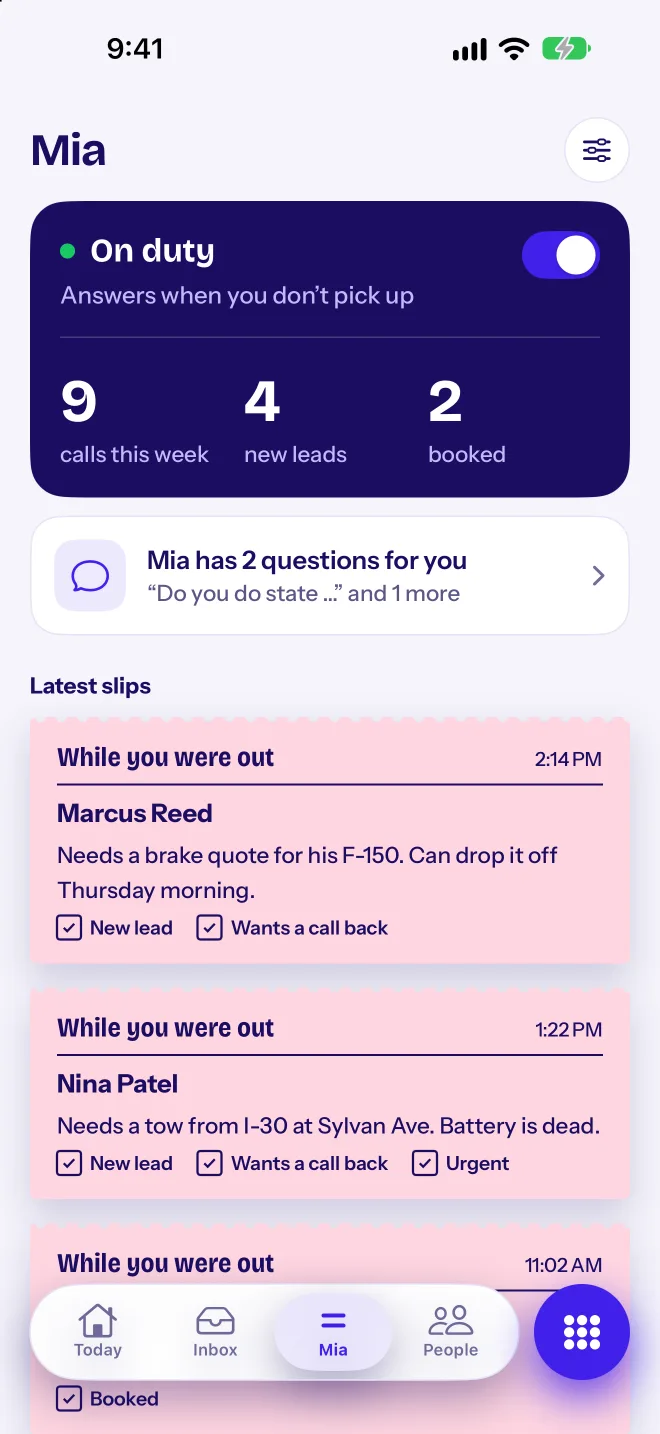
- 5You get a slipA written note on Today: who called, what they need, and ticks for New lead, Wants a call back and Urgent. Transcript and AI summary sit underneath.
When Mia answers
Pick one of three modes for each line, or turn her off. Switch from the app, a home screen widget or Siri, for example as you walk into a job.
Always
Mia answers every call on the line. Good for busy seasons, or when you’re on a job all day.
Only after hours
You take calls during your business hours, and Mia answers outside them. Hours are Monday to Friday, 9 to 5, until you set your own.
Only when you don’t pick up
Your phone rings first. If you don’t answer, Mia does. A good place to start, because you still take the calls you can.
What to teach her
Type your business name or website and Mia drafts the first version for you. Then check each part. The more specific you are, the better she answers.
| Business name and greeting | The first thing callers hear, for example “Thanks for calling Hollis Heating, this is Mia.” Keep it short. |
|---|---|
| Services | What you do and what you don’t, so she can tell a caller straight away if you’re the right fit. |
| Prices | Real prices or ranges, like “service call $89” or “drain clearing from $150”. She only quotes prices you gave her. |
| Hours | Your business hours. She offers booking times inside them, and appointments are 1 hour unless you change the length. |
| Where you work | The towns or neighborhoods you cover. For on-site work she asks for the job address. |
| Urgent words | Words that mean “put them through to me”, like “no heat”, “flooding” or “locked out”. |
| What not to promise | Anything she should never offer, like same-day visits or discounts. She sticks to it. |
Need words for the greeting? See our AI receptionist greeting scripts.
Pick her voice, then hear her
Warm
The default. Friendly and easy to listen to, a good fit for most businesses.
Bright
A brighter, more upbeat sound, for salons, studios and anyone who wants a lively front desk.
Calm
A calmer, steady sound, for callers who may be stressed, like a burst pipe or a lockout.
Whatever voice you pick, her name stays Mia. Tap “Hear Mia answer a call” in the app for a test call with her. It uses no credits, so make one after every change to her answers.
A sample call and the slip you get
A made-up call to a fictional heating company. The names, address and number are invented. Mia quotes the service-call price because the owner gave it to her.
Mia: Thanks for calling Hollis Heating and Air, this is Mia. How can I help? Caller: Hi, my furnace is making a rattling noise when it starts up. It still works, but it’s loud. Mia: Sorry to hear that. It sounds like a service visit. A service call is $89, and the tech will tell you the repair price before starting. Would you like to book one? Caller: Yes please. Anytime Thursday works. Mia: I have Thursday at 10 AM or 2 PM. Which is better, and what’s the address? Caller: 2 PM. It’s 88 Birch Lane. Mia: You’re booked for Thursday at 2 PM at 88 Birch Lane. You’ll get a text with the details. Anything else? Caller: No, that’s it. Thanks!
What callers get, and what you get
The caller gets
- One “what happens next” text from your number, once per call, like when you’ll call back.
- If they booked, a confirmation text with the time and place.
- A reminder before the visit. They reply C to confirm or R to reschedule, and you see the answer on the booking.
- After you mark the job done, a review request if you want one.
You get
- A slip on Today: who called, what they need and ticks for New lead, Wants a call back and Urgent.
- An AI summary of the call, 1 credit per call. On by default; turn it off in Settings.
- The full transcript under the slip, so you can check exactly what was said.
- Buttons to call back or text from the same number.
Hand to me, urgent words and quotes
- Hand to meWhile Mia is on a call, tap Hand to me in the app, or on the iPhone Live Activity, and the caller comes to you. Mia’s rate (48 credits a minute) stops, and the rest of the call is billed at the normal call rate.
- Urgent words you chooseAdd the words that can’t wait, like “gas smell”, “no heat” or “locked out”. When a caller says one, Mia tells them she’s connecting them and passes the call to you.
- Quotes from her pricesSend a quote built from the price list you gave Mia. The customer gets an itemized total by text. If they reply YES within 7 days, it’s marked accepted and the lead moves to Quoted.
- Bookings inside your hoursMia only offers times inside your business hours, in your business’s time zone. Travelling doesn’t move your hours; only you change the time zone.
Mia or a live answering service?
Live services such as Ruby start at $250 a month for 50 minutes (ruby.com, October 2026). With 2Line.AI, 50 minutes of Mia is 2,400 credits, about $36 at the 4,000-credit pack rate, plus your plan, and she answers every call at once, nights and weekends included. People are still better for calls that need judgment; that’s why Hand to me exists.
What Mia doesn’t do
- No emergency calls. 2Line.AI doesn’t support 911, and Mia can’t call emergency services. She flags urgent calls for you.
- US numbers only. Mia answers on local US 2Line.AI numbers. No toll-free, no international and no number porting.
- No CRM, Google Calendar or Zapier connections. Bookings sync to your iPhone Calendar, and leads and slips live in the app.
- No human receptionists. Mia is an AI. When a call needs a person, she hands it to you.
- She only knows what you taught her. Keep your services, prices and hours up to date, and make a test call after big changes.
- She needs credits. At zero credits, Mia pauses with calls and texts, and callers hear busy until you add a pack.
Not the other Mias
Other companies also use the name Mia, for car dealers, insurance and receptionists in other languages. Mia by 2Line.AI isn’t connected to any of them. She is made by 2Line AI LLC in the United States, and she only works inside the 2Line.AI app, on 2Line.AI phone numbers.
Read more: all 2Line.AI features, AI receptionist, 2Line.AI by trade, AI receptionist vs answering service and pricing.
Questions about Mia
What is Mia by 2Line.AI?
Is Mia by 2Line.AI the same as other AI receptionists called Mia?
How does Mia learn about my business?
Can I hear Mia before my customers do?
How much does a call with Mia cost?
Can I take a call from Mia?
Can callers tell Mia is an AI?
Can Mia call 911 or take emergency calls?
Put Mia on your line today.
Yearly comes with 3 days free. $19.99 a month or $99.99 a year.
Pick your number